
Changelog
What’s new in Jelly
New features and changes to how Jelly works, newest first. Follow along with the feed.
Pin the contact open, and use the full width of the window
Three new ways to spend your screen. All are your own settings, so nobody else's screen changes.
- Press Pin at the top of the contact card to keep it open beside every conversation you read. It sits next to the messages instead of over them. Press Unpin to go back to the tab.
- Turn on Use the full width of the window under Reading on your Preferences page, and your conversations fill the window, with longer lines in your messages, instead of stopping at a comfortable width.
- Use the sliders under Peek widths on the same page to choose how much of the views and the conversation list stays in sight while a conversation is open, or hide either one.
Keeping it open, The full width of the window and Peek widths, in the manual, have the details.
Choose the mailbox a new message opens in
If you're in a mailbox besides the default one, New message now has a Mailbox field under From. The conversation opens in the mailbox you choose once it's sent, and until then its draft is in Drafts only for the people in that mailbox. So a message you write from your own address can stay as private as the mail that arrives there.
Jelly remembers the mailbox you last chose for each From address, in the browser you chose it in, so you pick it once.
Read more about getting conversations into a mailbox. Mailboxes are a Royal Jelly feature.
Choose who can send from an address
An address no longer has to be open to the whole team. Open an address in Settings → Addresses, and under Who can send from it choose Only the people chosen, then pick the people. Say a boss's address for one person, or a finance address for two or three.
Anyone who isn't chosen doesn't see the address in a From list, and a message they try to send from it anyway is refused, with nothing sent. A draft already written from that address stays as it is, and can't be sent by someone who isn't on the list.
Every address starts as Everyone on the team, so nothing changes until you choose. Choosing who can send from an address is a Royal Jelly feature.
Mail between your own addresses reaches the inbox
When one of your addresses writes to another, for example pastor@ to
jennifer@ from a phone's mail app, the message now arrives in the
inbox like any other. Your rules file it, and the people following the
conversation are told. Before, it went to Spam.
If the same message also goes to somebody outside the team, with one of your addresses in Cc, Jelly records it as mail your team sent to them.
This needs your email provider to sign your mail with DKIM. A message that only claims to be from one of your addresses, without that signature, still goes to Spam. Mail between your own addresses, in the manual, has the details.
The classic layout, for anyone coming from the previous Jelly
If you used the previous version of Jelly and would rather keep its layout, turn on Use the classic layout under Reading on your Preferences page. On a computer, it changes two things:
- The views (Inbox, All mail, Sent, your labels and so on) are a menu instead of a column. Click the list's name, such as Inbox, to choose another.
- A conversation opens in place of the list. Press Esc, or your browser's Back button, to go back to the list.
It's your own setting, so nobody else's screen changes. The classic layout, in the manual, has the details.
Spam and Trash are deleted after 30 days
A conversation that has been in Spam or Trash for 30 days is now deleted for good, for everyone on the team. Its messages, notes, files and drafts all go, and it can't be got back.
The 30 days count from when the conversation was moved there. To keep one, press Restore (in Trash) or Not spam (in Spam) before then.
After 30 days, in the manual, has the details.
A whole new Jelly
Jelly has been rebuilt from the ground up. It's still the shared inbox you know: conversations, not tickets, and one price for the whole team. Underneath, everything is new. The entries below this one are from the previous version of Jelly.
Faster
Every screen has a speed budget, and Jelly is tested against it before each release: how long the page takes, how much it sends and how much work it asks of the server. A change that makes a screen slower doesn't ship. Moving between conversations updates the page in place, and new mail and notes appear without a reload.
More stable
This new architecture isolates each customer from each other, making it easy to make sure every team gets the resources they need, from the heaviest Jelly users to the smallest volunteer groups.
Advanced Rules
Now gradually rolling out to our Royal Jelly users is another oft-requested feature: rules that can match on multiple conditions:
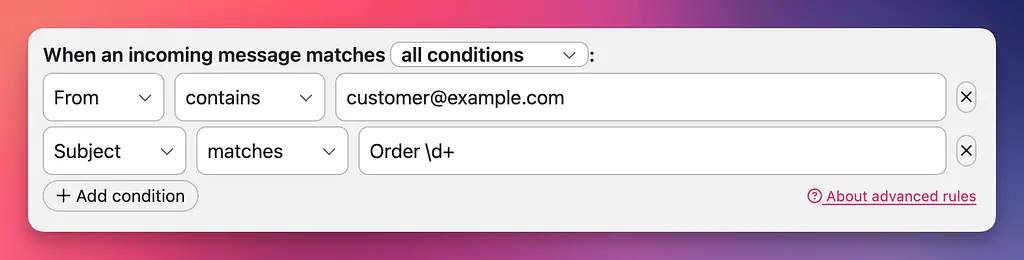
These more-sophisticated rules can require all conditions to match, or any one of them. They can also match based on simple expressions instead of requiring exact content -- for example, the rule above matches all messages from a particular address, and where the subject is “Order” plus a number of one or more digits, regardless of what the number is.
Read more about what’s possible with advanced rules in our Help Centre.
Advanced rules is a Royal Jelly feature, for teams that need a little more power in their automation; Jelly’s regular rules are still available to everyone.
Labelling improvements
Two improvements to labelling conversations in Jelly!
- It’s now much faster to add or remove multiple labels at once, because the label menu stays active until you dismiss it (I recommend hitting “esc”).
- You can now label multiple conversations at once. Simply select the conversations in any list by hovering over them and checking the box (or using keyboard shortcuts), then click the “Label” menu item:
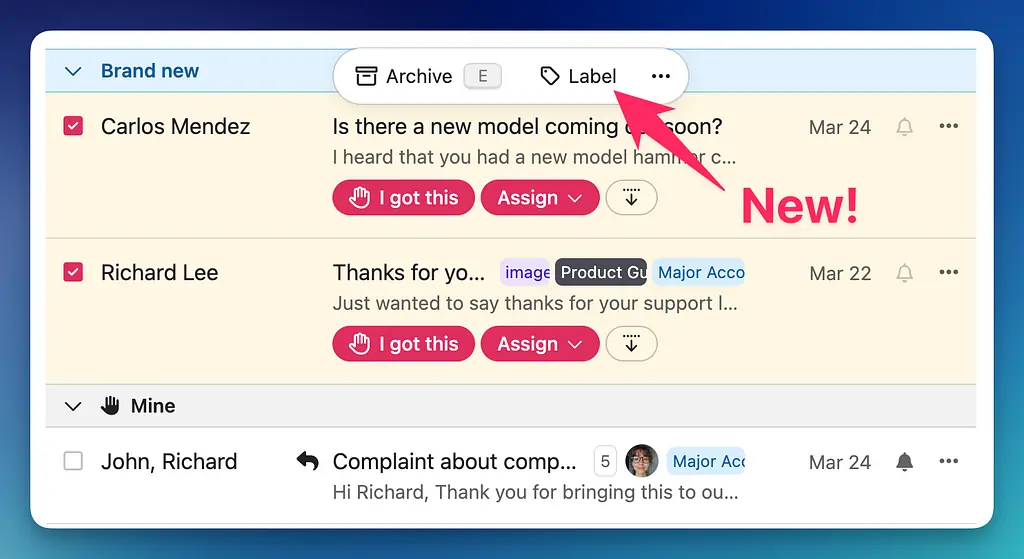
Also from within the actions menu (the “...“) you can mark as read, unread, delete and move multiple conversations to the trash.
Inbox Statistics
Often requested, now available: Jelly provides a view on your teams overall message flow, respond time, and other information to help you spot trends that might need action.
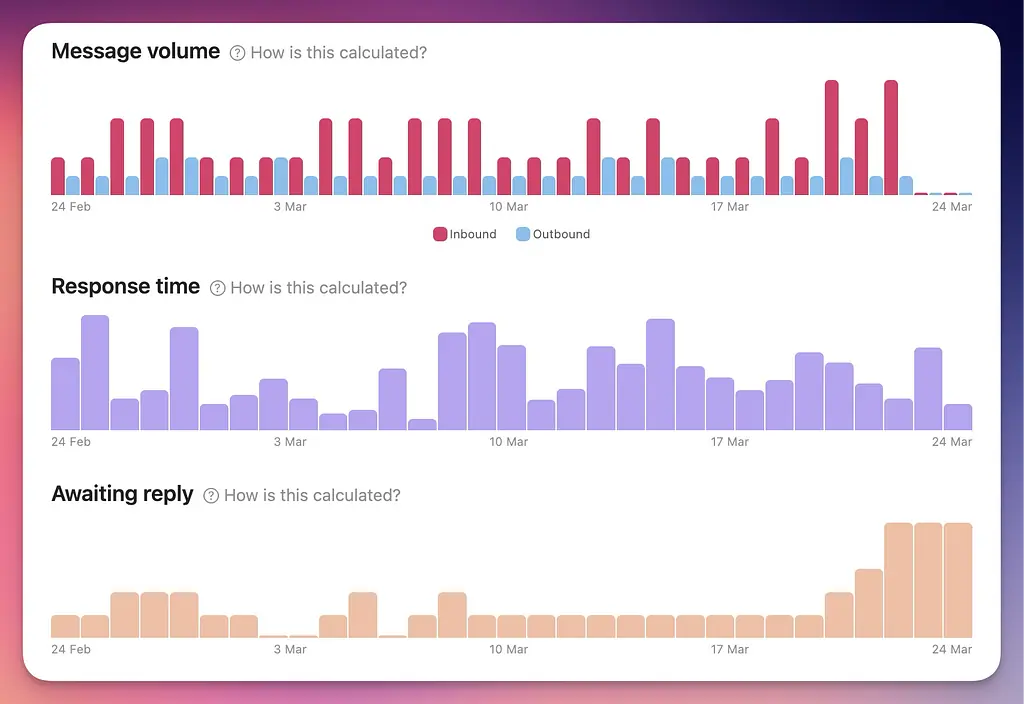
This feature is for Royal Jelly customers only, and we’re slowing rolling it out. If you’d like early access, get in touch!